Guides
Contents
Code Composer Studio (CCS) Setup
Installing Code Composer Studio
- update system sudo apt update
- install dependencies: sudo apt install libc6:i386 libusb-0.1-4 libgconf-2-4 build-essential
- download CCS from www.ti.com/tool/CCSTUDIO
- extract using tar xvzf CCS9.x.x.xxxxx_linux.tar.gz
- Install CCS by running ./ccs_setup_9.x.x.xxxxx.bin. Note: Select both MSP430 and MSP432 families to install all drivers needed
Note
If CCS was installed as user then run the driver install script cd <CCS_INSTALL_DIR>/ccsv9/install_scripts && sudo ./install_drivers.sh
Customising CCS
Code composer studio is an integerated developement envireonment (IDE) that natively supports the MSP430 line with powerfull debugging capabilities. CCS is based on the eclipse software framework which has a wide range of avalaible packages. A dark theme with a custome color scheme is used. Dark theme have many benfits like improved readability of text, better contrast and reduced eye fatigue. Research from S Brown from the University of Cambridge discusses the many benfits and negatives of a detailed research on using dark backgrounds on computer displays.
Eclipse has a popular theme called DevStyle theme, this theme can be seen on most of the screenshots and a special customizing for the colors can be found in the Extra folder in the project repository.
Installing this plugin can fail due to dependencies, it is therefor recommended to add
http://download.eclipse.org/releases/neon
to the
Go back to your IDE and click on “Install New Software…” in the “Help” menu.

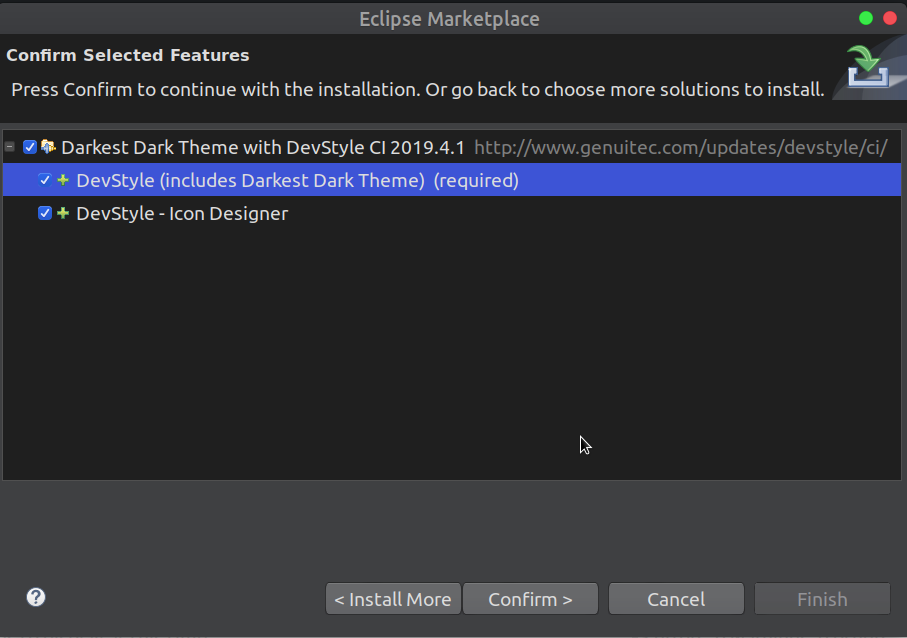
The theme can be found in the extra/CCS Settings folder and can be imported by going to
Windows –> Preferences –> DevSTyle –> Color Themes –> Import and choosing the .xml theme in the /extra/CCS Settings directory.

Building the Documentation
This doucmentation is built using Sphinx. A python package that allows to build easy to maintain documentation in HTML, pub and latex/pdf format.
In order to use the Sphinx package, python needs to be installed which is preinstalled on many of the modern linux disutros.
The doc folder contains the makefile for both windows and linux. You can run read README.rst for information on how to build these documentations.
- GNU/Linux Debian 7
- Git
- Sphinx 1.1.3 or higher
- Inkscape
$ apt-get install git
$ apt-get install inkscape
$ apt-get install python-sphinx
$ apt-get install python3-sphinx-rtd-theme
$ pip install -r requirements.txt
If it not already present, this will install Python for you.
- texlive
- texlive-fonts-recommended
- texlive-latex-extra
$ git clone https://jumaili@bitbucket.org/jumaili/data-storage-tag-project.git
$ cd data-storage-tag-project/docs
$ make html
$ git clone https://jumaili@bitbucket.org/jumaili/data-storage-tag-project.git
$ cd data-storage-tag-project/docs
$ make latexpdf
Learning Resources
Embedded systems have a lot of new terminology it is highly recommended to read the TI glossary that explains many of the common terms, acronyms and definitions of embedded systems https://www.ti.com/lit/ml/slyz022j/slyz022j.pdf.
The table below shows a collection of useful resources that were either researched or use during the developement process.
- Simulators
- LTSpice: Spice Circuit simulator from Linear Technologies.
- CAD Software
- Eagle: One of the popular EDA packages due to it’s (board size restricted) free version.
- Altium circuit maker: free online PCB design tool powered by Altium technology. (Not recommended).
- CircuitStudio: PCB deisgn tool by Altium Designer, cheaper in price with similiar capaabilitie, more functionalitythan Eagle.
- Altium Designer: The best in terms of funcality, highly recommended. Steep learning curve.
- Gerber Viewers
- Tracespace (tracespace.io): Online Gerber viewer that lets you inspect the individual layers as well as the board preview.
- Viewmate: Windows Gerber Viewer software http://www.pentalogix.com/viewmate.php(recommended).
- PCB Panelization
- Can be done using Altium Designer.
- CAM 350: http://www.downstreamtech.com/CAM350XL.html
- FAB 3000: http://www.numericalinnovations.com/fab3000.html
- Parts Search Engines
- findchips (https://www.findchips.com/)
- parts.io component search engine designed towards discovering new parts.